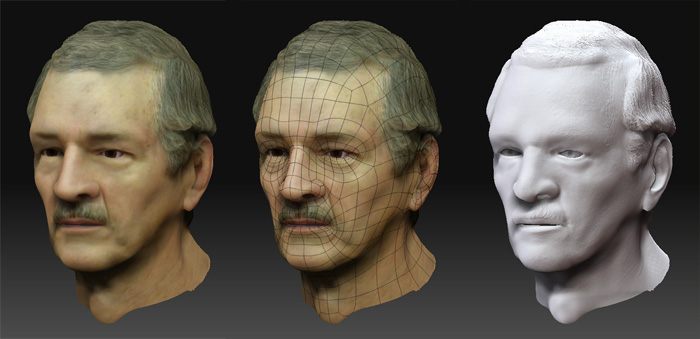
| 딱지_Zbrush | |


|
@ 2005-09-10 �� 2005-10-29 @
1 ���� #�� http://borasen.tistory.com/entry/Zbrush%EB%A5%BC-%EC%9D%B4%ED%95%B4%ED%95%98%EC%9E%901.1 Zbrush 3.*, Topology #���� �������� http://portfolio.ego-farms.com/ �� http://blog.naver.com/junon_bass/10030656341 #. Topology �������� 1. Zbrush ���� ������ ���������� �������� �� ������ ������ ���������� �������� Zbrush ���� ����������. 2. ���������� �������� Tool>Rigging>Select Mesh �� �������� ���������� �������� ������������. 3. Tool>Topology>Select Topo �� �������� ������ ���������� �������� ������������. 4. Tool>Topology>Edit Topology ������ ������ ������. 5. Tool>Projection>Projection ���� ������ 6. Tool>Adaptive skin ���� density �� ������ Previw ������ ������ ������. 7. Tool>Adaptive skin>Make Adaptive skin �������� ������ �������� ����!
cf.Topology�� �������� ���������� ������ ��������
#.Using Transpose and Topological Masking in ZBrush 3
- Topological Masking ������ ZBrush 3���� ������ ��������, ������ ������ ������ ������ �� ������ �� �� ����.
Move�� Scale, Rotate�� ������ 3���� ���� ���� �������� ���������� ���� ������ ������ �� ����, ctrl���� ���� ������ ������ ���� ������ ������ ������ ������ ���� ���� Mask������ ���������� ������ ������ �������� Mask�� ������ ���� �� ����.
+ Move Tool���� ������ ���� ������ ���� �������� ������ ������ ���� �������� ����,���������� Topology�� ������ ���� ������ ���� ���� ������ Mask������ �� ������ ����, ������ ������ �������� ������ Move�� Rotate, Scale�� ������ �� ������, ������ ���� ���� �������� �������� ������ ������ ������ �������� ����, ���������� ������ ������ ���� ���� ������ �������� �������� ������ ������ �� ���� ����.
Rotate Tool�������� ������ ���� ���� ������ ������ �������� ���� ���� ������ ������ ���� ��������.
2 ����; (��)���������� ������ PD #2.1 ���� #
���� - 1.������(2D)/ 2.������(3D)/ 3.��(����) --> 1�� 2�� ������ 3�� �������� ����.
--> 2.5D Painting/ Hybrid Programe
���� - ��������/ ������/ sculpturing(����) / Zsphere/ Claycf.3D ������ - vertex coloring
- Graphic����(������)/ stop Animation/ ����(uv)
���� - ������ + ������(tool����) + ���� + ������
2.1.1 pixel�� pixol�� ���� #
pixel - ���������� ����; ����(x,y)/ ����(rgb)
pixol - pixel����(����(x,y), ����(rgb)) + Z(deep) + ���� �� ����
-.Z ���� ���� �������� ��������(������ ���� ����)
cf.������ = Pixol + login --> ������ pixol�� o�� z�� ���������� ==> Zbrush(������)-.����; 1.������(Normal �� ��������)/ 2.����/ 3.������/ (Shading)/ 4.�������� ����. 2.2 ������ �������� #
1 *.zbr --> pixol ������ ���� ����
2.*.psd --> 2D �������� ����
-.������ ������ ������ ������ ����
3.*.ztl --> Zbrush Tool-.������ ������ ������������ ��������
-1) Tool/ Texture���� UV���� -- group UV����
-2) Tool/ Texture���� col>Txr�� ������������. 4.*.obj�� �������� ������, ���� �������� ������ ������ ������ ��������.
-.�������� ���� ���� ������������, ���������� V-flip�� ����(�������� ����)�� �������� ��������.
5.Zbrush�� �������� UV�������� ���������� ����������,
--> ������ Zbrush�������� ���� ���� ���� �������� ������ ����
-.������ x,y������ ������ �������� ������ +z���� ��������3D �������� Zbrush�� ������������ ���� --> ��������/���������� U ���� V-flip ���� �� ����.
�������� ������ ������ �������� ������ ���� ���� ������, ���� ���������� �� ������ ����
6.pixol �������� �������� ������ 2D ���������� ������, �������� ������ 2D ����������.7.���� ������ �������� ������. 2.3 ���� #2.3.1 ������ #
�� ���� ������ ������ �������� ��������.
C - �������� color ����
X - �������� T - Edit object(3D object); Shift+F - Draw polyframe(������������); Ctrl+ - ���� �������� �������� ���� Ctrl+D - ���������� Ctrl+N - Layer ������/ clear Ctrl+Shift+I - Preference/ config/ store Config���� ���� ������������ ���� Ctrl+Z - Undo/ Ctrl+Shift+Z - Redo 2.3.2 ���� ���� #
0924-1.���� ����
1) 2.5D ������
0924-2.���������� ����2) 2.5D Z(x) ==> ������ 3) 2D ������ -.2)�� 3)�� ������ Color ������/ Fill Layer(���� 0�� ������ �������� ����)��
���� pixol(z=0)�� ���� �� ���� ������ ����.������ ������ ������ ������ ������.
-.Preference/ Interface ���� ; ������ ���� ���� �� �������� ���������� ����
0924-3.stroke ����-.Preference/ config/ store Config ; UI ����( Ctrl+Shift+I )
--> �������� ������ UI�� ���� ( zbrush ���������� ������ ���� ���� ���������� ������ UI���� )
1) Fill Layer/ 2) ������(tool)/ 3) ������/ 4) stroke ����
0924-4.primitive 3D ���� ���� ����
1) 3D object/ 2) 'T' - 3D ��������
0924-5.Visibility Control --> �������� �������� 43p ����3) Tool> Masking> Mask All/ 4) ���� ���� ����/ 5) Row/ Col�� ���� ���� ���� 6) Tool> Deformation> Inflat���� 2.3.3 10/07 ���� ������ #
2.4 Q&A #
00.�������� ���������� ���� ����
00.���� ������ �������� ���� 2.4.1 ������ #
01.���������� ������ map���� ���� ����������,
���������� ���������� �������� ������ --> ���� 2D�� ������ ����
02.3D ���������� ����������
color ���������� ���� Fill Object ���� �� ����
03.Drow Size/ Fall off ����( Focal shift ) 04.Tool/ MRGB ZGrabber�� ������ ���� ������ ����
--> Alpha/ Make 3D�� ������ 2.5D(���� ������)�� ���������� ���� �� �� ����.
2.4.2 ������ #
01.Layer������ 2.3D ���������� �������� 3D������ ������ �� ����.
02.Mirror����(Transform ������/ "x" �������� ����)
-.���������� ������ ���������� �� ���������� �������� ������
03.�������� Zbrush ������ ������ �������� ������.
���� ���� ���� ������ ���� ������ ���� ������ ������.
-.max�� ���� ���� ������ �������� Z-plugin(free)/ Refernce Image���� plugin�� ��������.����, ���� ������ ���������� �������� ���� �������� ������ ���� ���� ����. -.������ �������� 2���� ������ ���������� ������
������ ������ �������� ���� ���� ������ ��������.
--> ������ �������� �������� �������� ���������� primitive 3D���� ���� ���� ������ ��������.
04-1.3D ���������� ����(���� ��)����
0) ���������� ���������� ������ ������ ����.
04-2. 2.5D ���������� �������� ����1) Projection Master�������� ���� �������� ������ ���� 3D �������� �������� ������ ����. 2) 3D -- Drop --> 2.5D -- Pick up --> 3D
-.3D -- Drop --> 2.5D ; �������� ������ ������ ���� �������� ������ ������ ����.(��������)
cf.������ �������� �������� ������ ������ pixol���� ������ ������ ������ �������� ��������-.2.5D -- Pick up --> 3D ; pixol������ deep ���� ������ ������ ��������.
������ ������ �������� ����.(2.5D ���� ���� ������ ���� �������� 2D ����������.)
--> �������� �������� �������� 3D ���������� �������� ���� ������ ��������.
05.MultiMaker�� �������� object�� Boolen�� ����(??)
1) ���������� �������� ���� ����
06.Set Pivot/ Creat Pivot07.Local Mode; ������ �������� ���� ������ ������ ������ ������ �������� ������ ����. 2.4.3 Displacement�� Normal �� ���� ## �� ����
00.Multi_Rosolution(��������)
# �� ����
Low(sub=1)--*(�������� ����)--*(������ ����)--High(sub=5����) ; ������ ������ Normal map�� Displace map ������ ����.
01.��������������������(sub=1)�� Morph Target/ store�� ����������
�������������� �������� + ���� ������ ������������ ������ ����.
-1.Tool> 3D Cube (���� ������ ������)
02.���� ���� ���� + ����-2.Tool> United skin > Res 128 --> 8 > Make US (���� ������ ������) -3.Object ����
-1.Tool > Morph Target > Store MT
03.�� ����
-.������������ ���� ������ ���� ��������(sub=1)�� ����
-2.Tool > Texture > UVp-3.Object ��������, ����(T), ����������(Ctrl+D); 3~4�� -4.skirting ����
-.������ ������ ���� (���� ������ �������� ���� ������ ������ ������ ����)
-.Projection Master(G) �������� ����(������ �������� ����)
[ Deformation, Faile ���� (Normal(off)) ] -- 2.5D --> Z-add�� Z-sub�� ����
������ ���� ������ ���� �������� ����
-1.Tool > Geo > sub = 5 --> 1(sub = 1 �������� ���������������� �� ������ ����)
-2.Tool > MT > switch -3.Tool > Displace Map > DM Creat # �� ����
-.���������������� �� ; ������ �������� ���� (�������� �������� ���������� ������ �������� ����)
--> �������� �������� ���� ������������ ��������.
-.���� �� ; ������ ��������-.�������� ���� ������ bump���� ���� ����.
--> ���������� ���� ���� �������� ���� �������� (��������)
|
지혜는 갖고 다니기엔 쉽지만 얻기엔 힘든 것이다. 메모장_수업D3D HelpContents Format_Page01 Report_카_장 |